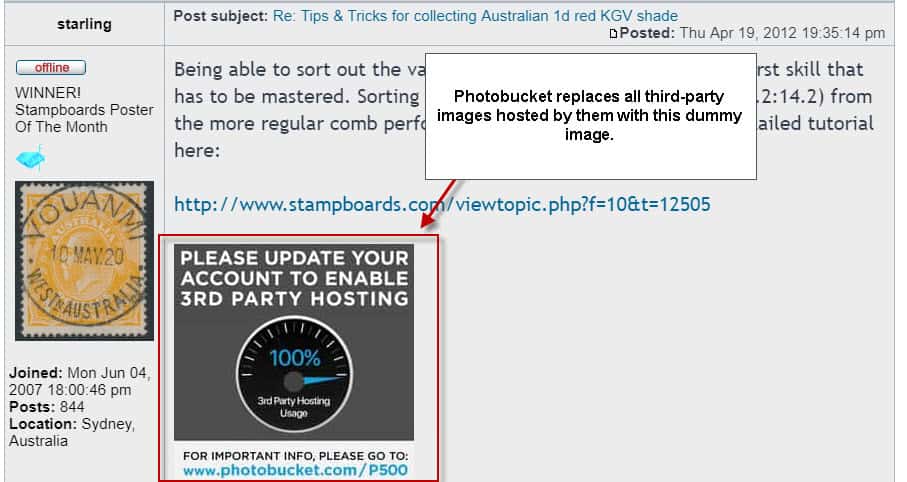
Photobucket disabled the third-party hosting of images functionality of the site recently which had been a part of it for years.Internet users who used Photobucket for that, that is store their images so that they can embed them on other sites, were asked to pay $399 per year, or $39.99 per month, to reactivate the functionality.This was done with barely any advanced warning that this would happen, and the replacing of all images on third-party sites with a dummy image asking users to become a Plus 500 subscriber to restore the hotlinking functionality.
I’m going to list several Photobucket alternatives in this article that users affected by the move, and Internet users who are looking for reliable image hosting with hotlinking functionality have.
Photobucket Alternatives
You have plenty of options when it comes to services that provide you with options to hotlink your images.
There are a couple of things you need to be aware of before you select the next best offer though:
Some services may allow hotlinking of images, but they Terms of Service gives them the right to terminate your account at any time if they find that you use this excessively (read: you cost them too much).
Other services may be owned by a larger service. This is for instance the case for TinyPic which is owned by Photobucket.
Some image hosting sites are quite catastrophic when it comes to advertisement. A user clicking on your image may be directed to a page filled with advertisement. These are often low quality ads, or worse.
As far as alternatives are concerned, there are three groups that you may pick one from:
Image hosting sites — These sites are designed for image hosting on the Internet. They work similar to Photobucket.
Services that allow you to upload files, and link to them — These services may not be designed specifically for the embedding of images, but they support it.
Web space — Your own private website or server that you use for hosting and embedding of images.
The first two groups may allow you to hotlink to images right now, but they may have a change of heart (or policy) at any time in the future. The advantage of the third group is that you are in control, but that you have to pay for that.
Photobucket Image Hosting site alternatives
Cubeupload — A free image hosting service that does not require an account for use. It uses a donation-based system for keeping the service up and running.
Flickr — While Flickr’s future is not clear right now, with the purchase of Yahoo by Verizon, it allows you to host your uploaded images elsewhere provided that you link back to Flickr. Also, may not be used as a content distribution network for websites or applications.
Flickr makes it possible to post content hosted on Flickr to other web sites. Pages on other web sites that display content hosted on flickr.com must provide a link from each photo or video back to its page on Flickr. This provides a way to get more information about the content and the photographer.
Imgur (but only with the Embed option) — Imgur is named as an alternative whenever it comes to image hosting services on the Internet. While you may hotlink to images uploaded to Imgur, the service’s Terms of Service forbid you explicitly from doing so. What it allows is to use the embed feature, but this may not work in many cases. Also this which does not bode well.
Don’t hotlink to adult content or to file-sharing, gambling, torrent, warez, or Imgur rip-off sites. Don’t impersonate someone else. Also, don’t use Imgur to host image libraries you link to from elsewhere, content for your website, advertising, avatars, or anything else that turns us into your content delivery network
VGY — A free image hosting service that requires no account. You can upload the image directly to the service, and get some embed codes and the direct URL to the image displayed on the next screen automatically.
Read also:Analyze Amazon reviews for authenticity
Other services that you may use
While it would go too far to list dozens of services that provide you with image hosting and linking functionality, I’d like to highlight some of the options to you.
These are all free at the time of writing:
Blogger — Google’s blog platform is just a quick sign up away. You can set up a new blog there using your Google account, and may upload the photos that you plan to display elsewhere on the Internet to it. It may not be the most straightforward way of doing this, but it has worked reliably for users for years. Other blogging platforms may allow this as well. Google Photos works as well, but it is not super intuitive and requires that you copy the direct link to the photo.
GitHub — GitHub is designed for project hosting. Anyone can create an account, and you may upload files to the service. GitHub may suspend accounts or throttle them if they find that it requires excessive bandwidth.
If we determine your bandwidth usage to be significantly excessive in relation to other GitHub customers, we reserve the right to suspend your account or throttle your file hosting until you can reduce your bandwidth consumption.
Your own web space
If you want full control, you may have to pay a couple of bucks for that. If you have a website or server already, you may use it to host your images, and hotlink to them.
The core benefit here is that you control the storage. You may delete images, modify them, prevent certain sites from linking to them, and so on.
The disadvantage is that you have to pay for that, and that there is a setup period involved usually.
Here are a few options:
Amazon S3 — Amazon AWS has a free tier that is good for 5 Gigabytes of storage, 15 Gigabytes of data transfer each month, and 20000 get requests. It gets quite expensive though when you leave the free tier, as you pay $0.090 per Gigabyte. The offer is free for the first 12 months only.
VPS Servers — A VPS is a virtual server that starts at a couple of bucks per month. You can grab a 10 GB Storage VPS with unlimited traffic from OVH for $2.99 per month for instance.
Now You: Do you use another alternative? Feel free to share it in the comments below.
Summary
Article Name
Photobucket alternatives for third-party hosted images
Description
The guide lists alternatives to the image hosting service Photobucket which recently began to block hotlinked images on the Internet.
An oddly polite back alley boxing match / street fight on Aug 18, 2017. Some time after 3 am. I couldn’t tell if this was a “fight” or a semi friendly pugilistic bout.
They had a referee who got them to stop when he asked.
Shot with a Samsung Android S7 Phone and color corrected in Adobe After Effects and uploaded to YouTube.
Season 2, After they flee the CDC, they think they can go to the hideout of their former enemies and maybe now friends, the Vatos who are hiding in a relatively secure “old folks home”.
They find the place over run by walkers.
Its a great idea doing a “sequel” to the Season 1 Vatos episode. They never explained what happened…. WHO killed them? The Governors group? The saviours were too far away.
I think this scene was cut because of a few logical errors in the writing.
If they could blast a swarm of walkers in one scene why kneel down and hide from ONE walker int he next scene. And how could Darryl figure out what happened before the two cops in the scene?
Receiving a question about pricing can be daunting and tricky to navigate. On the bright side, receiving a price inquiry is a definite sign of interest and should be exciting! When a couple makes an inquiry regarding price, you should see it as a buying signal rather than a red flag. If they are reaching out, it means that they’ve vetted you and you’ve made it to the final round, so making an inquiry is simply the next step for them.
Education Expert Alan Berg shared some of his do’s and don’ts of pricing in our July Premium Webinar last week (Premium Members can watch the full recording in their account Education Center). We’ve pulled together a list of his best tips to help equip you for those often-dreaded pricing questions when they hit your inbox.
DO’S
Do reply as quickly as possible to an inquiry. If you respond to a potential client within 5 minutes, rather than 30, you are 100x more likely to connect with that lead. Why 5 minutes? That’s fast! By responding in 5 minutes, you can almost ensure that the person is still mentally and physically in the same place rather than having moved on to other things.
Do reply on the same platform that they used for their inquiry. The best practice here is to give couples all the possible ways to contact you, let them choose what works best for them, and then promptly reply on that channel.
Do acknowledge a question about price, don’t dodge it. If you need more information to give an accurate price, that’s completely fine! Just be upfront and transparent about it. Let them know that you are going to get them an answer, you just need to gather a bit more information about their big day first! Then, make sure to ask questions to start gathering that information to show that you are taking the necessary steps towards getting them that answer.
Do provide some pricing information on your website or WeddingWire Storefront. Couples are likely to distort their budget or may have a skewed sense of it (couples tend to underestimate their wedding costs by 40%!). Ideally, your pricing information would be available to them on your website or WeddingWire Storefront before they even reach out. 88% of couples want to see pricing of some sort before getting in contact with a vendor. That means you could be cut from the short list before you even have the chance to talk to them, so don’t hold out.
DON’TS
Don’t assume that a couple can’t afford you just because they are asking about price! How often do you determine the price of something before buying it? Probably all the time! Because this is a first time shopping experience for most couples, they don’t necessarily know what their needs are or what they are looking for, and therefore don’t know what other questions to ask. You are their guide, so help them out!
Don’t lead with your lowest price. Typically, the first number you hear is the number you expect to pay, which ends in an unfair result for everyone. Instead, give a price range. As a simple example you can say, “Our prices range from $x – $x, with our most popular option being $x.”. Along with a price range, consider pointing out some of the ways you differentiate in order to sell them on you, not just your price.
Don’t be afraid to address a low budget. If a couple gives you an idea of their budget for your service and it’s far below your pricing, politely let them know that you completely understand but that you cannot deliver the quality of work that you do within that budget. If possible, try to give them other options that you can provide, although it won’t include everything that they want, within their budget.
Don’t dump data and attachments. Instead, give a short, concise answer and try to make sure that it fits on a smartphone screen without the need to scroll. Most people will be answering and opening on their phones and if the information given is too long or overwhelming they aren’t likely to read it or keep it.